
Stop using Claude casually & start building systems around it
Turn Claude into operational leverage

This article covers:
• How to stop using Claude casually and start building systems around it
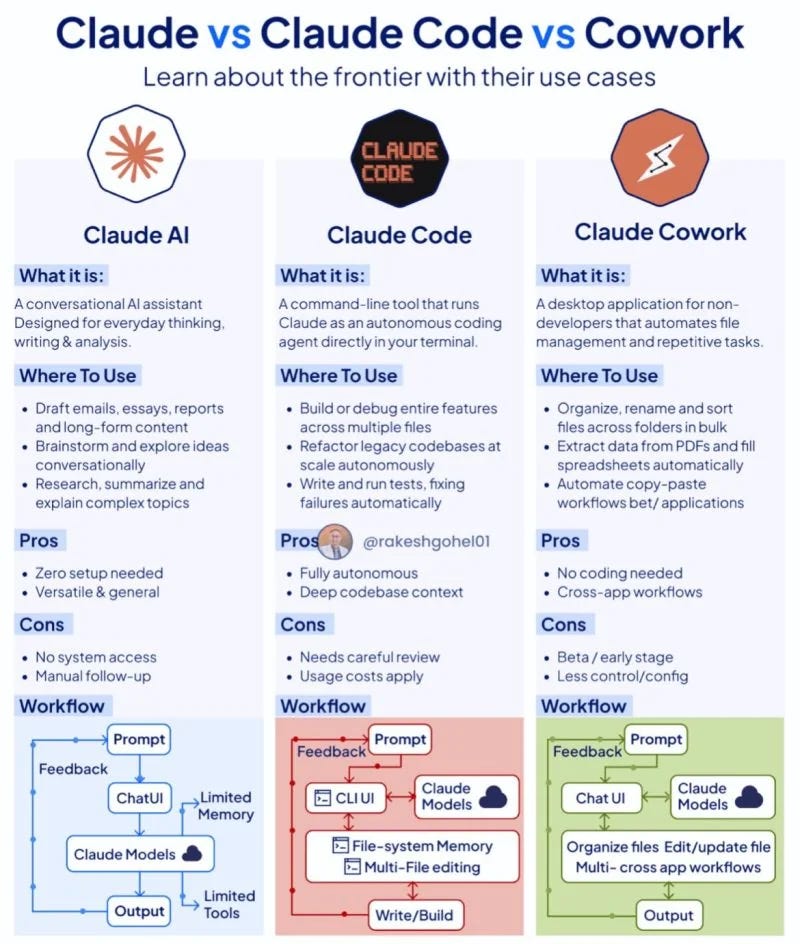
• The difference between Projects, Skills, Workflows, and Cowork and how each works together
• How to build a persistent AI workspace tailored to your business, work, and thinking style
• Practical ways to automate repetitive writing, admin, meetings, research, and content tasks
• Real examples of AI workflows that save hours every week
• How Cowork enables AI to take actions, not just generate text
• The best order to start building your AI infrastructure
• How to reduce mental load and reclaim cognitive bandwidth using AI
• How to turn Claude into operational leverage instead of just another productivity tool
Most of us are using AI daily for writing and summarising. While the results are good, we are still briefing from scratch every time. Still spending mental energy on tasks that could run without our input. Still treating Claude as a very capable assistant who forgets everything overnight.
The ceiling is not a limitation of the tools, but the absence of infrastructure.
This part covers the four things that we must know: Projects, Skills, Workflows, and Cowork.
1. Projects: stop briefing from scratch
A Project is a persistent workspace in Claude.ai. Inside it, you write standing instructions that apply to every conversation you have within that Project. You upload the files Claude needs to know about. Every time you open it, Claude already has your context before you type a word.
Without a Project, you have to re-explain your brand, re-paste your style guide, and re-describe your audience. That is three to five minutes of setup time before each task, which adds up to hours over the course of a month.
With a Project, it is already there.
How to build your first Project:
Step 1: Go to claude.ai and create a new Project.
Step 2: Write standing instructions. Cover who you are, what you do, who your audience is, what tone you write in, and any rules Claude should always follow. Example:
“I am Anna, founder of a women’s health company called Zora Health and a community for ambitious professionals called My Brilliant Self. I write for people aged 30 to 50 across Asia. My voice is direct, warm, and sharp. No corporate language. No em dashes. British spelling always. My audience is time-poor and values substance over inspiration.”
Step 3: Upload your key reference documents. Brand guidelines, your bio, your content pillars, past pieces you want Claude to match in voice, and your most common brief templates.
Step 4: Start using it for everything in that context.
P.S. If this resonates, join My Brilliant Self. We’re building the best environments to master AI, learn from world-class leaders, develop high-impact skills, grow financial confidence, and connect with peers who accelerate your growth, expand your opportunities, and increase your influence. If you’re serious about long-term growth, you’ll know if it’s for you. 💪🏻
How many Projects to build:
One per distinct context. One for your primary business. One per major client if you do client work. One for your book if you are writing one. One for your investment practice. Each Project gives Claude a different frame of reference before you start.
The first Project takes 30 to 45 minutes to set up properly. It pays back inside the first week.
2. Skills: define once, use forever
A skill is a repeatable instruction set you write once and invoke by name. It tells Claude how to approach a specific type of task: what format to use, which frameworks to apply, what tone to adopt, what to include and what to leave out. Every invocation produces the same quality of approach without re-briefing.
How to identify what skills to build:
Notice what you repeatedly brief Claude on. If you explain the same thing in three separate conversations, turn it into a skill.
10 skills worth building:
Email writer: takes a bullet-point brief and produces a polished email in your tone for a specified audience
Newsletter section writer: turns rough notes into polished prose, matching your publication’s voice and format
Meeting debrief: converts raw notes into decisions made, actions assigned, and open questions
Content repurposer: turns one long-form piece into a LinkedIn post, an Instagram caption, and a short thread
Subject line generator: produces 10 subject line variants with notes on the psychology behind each
Job description writer: drafts role specs from a brief covering the responsibilities, requirements, and culture fit
Proposal framework: structures a client proposal from a brief including the problem, solution, scope, and commercial terms
Decision mapper: takes a decision brief and produces a structured breakdown of options, trade-offs, and risks
SOP formatter: turns messy process notes into clean, numbered standard operating procedures
Weekly review: structures a personal reflection using a consistent framework every week
3. Workflows: take yourself out of the loop
A workflow is a multi-step automated process. It chains tasks together (trigger, process, output) across tools and systems. The defining feature: it runs without you having to restart it.
3 concrete workflow examples:
Weekly investor update.
Trigger: every Monday at 8 am. Process: Claude pulls the week’s key metrics, synthesises them into a narrative, and drafts a two-paragraph investor update in your voice. Output: drops into your email drafts for review and send. Time saved: 45 minutes a week.
If AI feels overwhelming, confusing, or overhyped, this series is for you.
I’ve spent the past few months using Claude extensively to save hours, think better, and reduce mental load. I’m here to help you shorten the learning curve and use AI in ways that genuinely improve how you work and live.
Claude 101: The complete beginner’s guide for busy people.
Part 1: What Claude is and how to start today
Part 2: How to actually get good at Claude
Part 3: Claude glossary, every term explained plainly
Part 4: The advanced layer: How to stop using AI casually and start building with it
Part 5: 100 ways to use Claude to think more clearly, work smarter, and move faster
